How to Practice for a Specific Job Posting (Not Just Generic Interview Questions)
You've seen the lists. "Tell me about yourself." "What's your greatest weakness?" "Where do you see yourself in five years?"
These are useful for the first 30 seconds of an interview. The next 45 minutes are about the specific job — its tech stack, its problems, the work the hiring manager actually needs done. And that's where most candidates freeze, because nobody practices the exact interview they're about to walk into.
Here's the workflow we recommend for candidates using ResReader for Candidates. It uses the AI mock interview, but the principles work even if you're practicing with a friend.
Why generic prep fails
A senior interviewer at the company you're applying to isn't going to ask you Glassdoor's "top 10 questions." They're going to ask:
- About a project on your CV that's relevant to a problem they're solving.
- About a specific skill the job description lists as mandatory.
- About a gap, transition, or unusual stretch in your background.
- A follow-up question to whatever you just said.
You can't rehearse for that with a generic question list. You have to rehearse against the actual job description and your actual CV — together. That's the practice loop AI mock interviews unlock.
Step 1 — Save the exact job description you're interviewing for
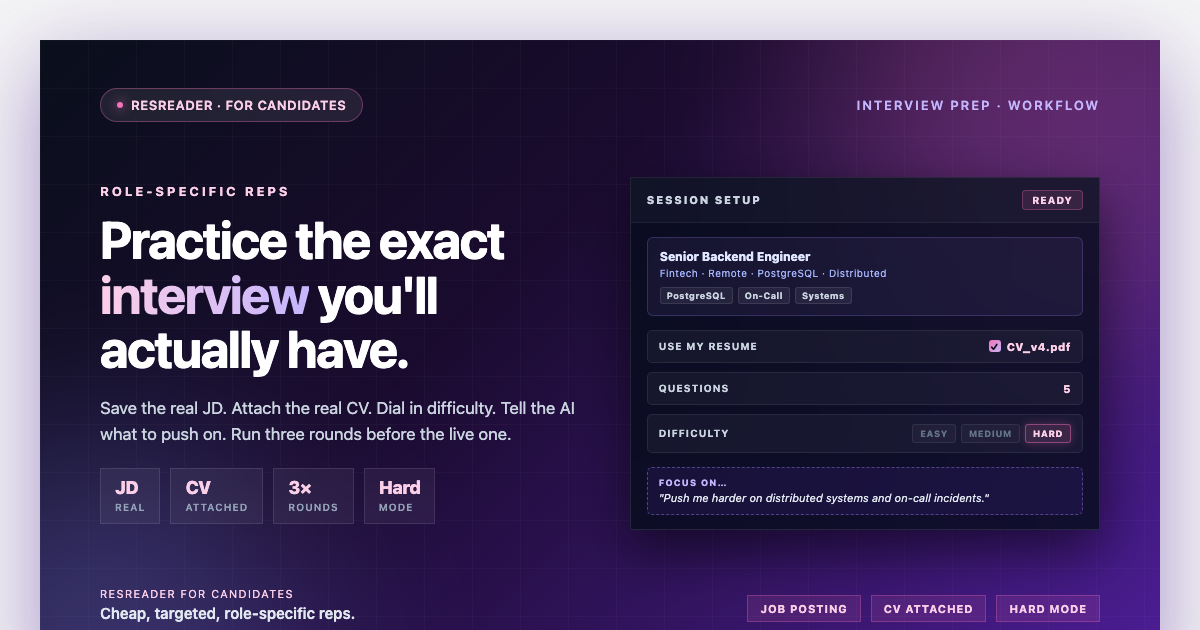
Open the Mock Interview tab in ResReader for Candidates and save the job description you're targeting. Two ways:
- Paste the job description text from the company's careers page directly into the new-job-description dialog. You can also paste the source URL as a reference, but the AI uses the text you paste — not the link.
- Use the ResReader — Save Job Description Chrome extension (Ctrl/Cmd+J) on any open posting. The extension reads the page, cleans it up with AI, and drops a structured job description straight into your account — no copy/paste needed.
Don't trim the job description. The "About us" section matters less, but bullet points like "experience with PostgreSQL" or "led a team of 5+ engineers" are exactly what the AI uses to generate questions. Leave them in.
Step 2 — Attach your real CV
In the session setup screen, toggle Use my resume on and pick the version you actually submitted (or will submit) for this role.
This is the step most candidates skip — and it's the most important one. With a resume attached, the AI grounds questions in your real history. Instead of "Tell me about a time you led a project," you'll get "I see you led the data migration at [your last company] — what was the riskiest decision you made there?"
That's the difference between practice that builds confidence and practice that builds answers.
Step 3 — Pick the right difficulty
ResReader has three levels:
- Easy — lighter probing, conversational pace. Good for warming up.
- Medium — balanced depth, occasional follow-ups. The default for most users.
- Hard — relentless follow-ups, "tell me more about that," edge cases, and pushback on vague answers. This is what a top-tier interviewer at a competitive company actually sounds like.
Our suggestion: start on Medium for your first session on a new job description. You'll learn what questions matter. Then bump to Hard for retakes. By the third session, you should be holding up on Hard.
Step 4 — Steer the AI toward what you're weak at
Under the difficulty selector there's an optional field labelled "Anything we should focus on?". Use it.
- "Push me harder on system design."
- "Ask more behavioral questions about handling conflict."
- "Make me explain how I'd debug a production outage."
- "Probe my experience with [specific tool from the posting]."
This is the closest thing to telling a real interviewer "I want to be tested on X." Use it ruthlessly. Practice your weakest area first.
Step 5 — Run the session like a real interview
Sit at your desk. Camera on. Use the same setup you'll use for the actual interview.
When Alex (the AI interviewer) speaks, listen. When it's your turn, don't read from notes. The whole point is to rehearse delivery, not content. If you can only answer with notes in front of you, you don't know the answer yet — and that's the gap the practice is showing you.
Two practical tips:
- Talk for at least 60 seconds per question. Short answers don't generate useful feedback. Aim for the same depth you'd give a real interviewer.
- If you don't know, say so out loud. Then attempt your best guess. The AI scores how you handle uncertainty, which is what real interviewers are watching for too.
Step 6 — Read feedback in this order
After the session you'll get an overall score (0–100), strengths, areas to improve, and a per-question breakdown.
Read them in this order:
- Per-question scores first. Find your lowest-scoring answer. That's the question that would have cost you the offer.
- The one-line coaching tip on that question. It tells you exactly what was missing.
- The study guide for that question. ResReader generates an "ideal answer" with the 3–5 key points a strong response would have hit. Compare it to what you actually said.
- Areas to improve overall. These are patterns across the whole session — usually structural (rambling, no examples, weak closes).
- Strengths last. Confidence-building matters, but only after you've seen the gaps.
Step 7 — Retake. Then retake again.
Open the same saved job description and start a new session. ResReader skips questions you've already practiced, so you're not just re-running the same drill. Each retake stretches you a little further into the role.
After three or four sessions on a single role, you've effectively been through a 15–20 question interview with real-time feedback after every question. Most candidates see their score climb meaningfully between sessions — not because the AI got easier, but because they've internalized how to answer this specific job's questions and stopped repeating the same gaps.
A worked example
Say you're a backend engineer applying for a senior role at a fintech that emphasizes PostgreSQL, distributed systems, and on-call leadership.
- Session 1 (Medium, with CV): You score 64. The AI flagged your distributed systems answers as vague.
- Session 2 (Hard, focus note: "push harder on distributed systems"): You score 71. Tighter. Still weak on incident response narratives.
- Session 3 (Hard, focus note: "ask me about on-call and production incidents"): You score 83. You've now talked through three different real incidents and have crisp, structured stories.
- Real interview: You hear "tell me about a production incident you led" and you have three stories ready. You pick the best one and deliver it cleanly.
That's the workflow. It's not magic — it's reps. The AI just makes the reps cheap enough that you'll actually do them.
What this is and isn't
This isn't a replacement for technical study, a mock interview with a senior engineer at the company, or actually understanding the role. It's a way to rehearse delivery — to make sure that when you walk into the real interview, you've already had a version of the conversation.
The candidates who get offers aren't the ones who know the most. They're the ones whose answers come out fluent, structured, and confident. That comes from reps. ResReader gives you cheap, targeted, role-specific reps.
Get started
- Open the Mock Interview tab.
- Save your target job description.
- Attach your CV.
- Run three sessions before the real interview.
That's the whole protocol. The first session is the hardest one to start — once you're in the loop, the work compounds fast.
Hiring? Try ResReader for teams →