Async AI Video Interviews — What They Are and How ResReader Runs One
The first-round interview is the most expensive part of hiring. A recruiter spends 30 minutes on a call with someone who doesn't make the cut, and that time is gone. Multiply across a dozen open roles and you have a calendar that doesn't scale.
Async AI video interviews fix this by inverting the model: the candidate records their answers when they have time, an AI grades the result, and the recruiter only spends time on the candidates worth their attention.
This post explains what async AI video interviews are in general, then walks through how ResReader's specific flow works end to end — from recruiter invite to scored scorecard.
What is an async AI video interview?
"Async" means asynchronous — recruiter and candidate aren't on the call at the same time. The candidate sits down at whatever hour suits them, answers a set of questions on camera, and submits. The recruiter reviews the recording (or, in newer tools, the AI-generated summary of it) later.
"AI video interview" adds the layer that distinguishes modern async tools from a 2010-era VHS submission:
- The questions are dynamically generated from the job description, not a fixed library.
- The session is transcribed as the candidate speaks.
- The AI scores each answer against rubrics that match the role.
- The recruiter sees a structured scorecard, not just a video file.
For a hiring team, the value is simple: 30 candidates can complete async interviews in a day. A recruiter doing live first-rounds gets to maybe 6.
How ResReader's async interview works, end to end
Here's the full flow.
1. The recruiter sends an invite
From any candidate's profile in ResReader, the recruiter clicks Send AI Interview. A bottom sheet opens:
- Pick an email template (you can save custom templates per workspace).
- Optionally include a Calendly link (for candidates who want to schedule a follow-up live call after their async session).
- Send.
For high-volume hiring, the same flow is available in bulk — select multiple candidates from the applications list and send invites to all of them in one go. Each candidate gets their own unique, tokenised interview URL.
2. The candidate records in their browser
The candidate clicks the link in their email and lands on a lobby page. The lobby does a quick device check:
- Live camera preview so they can see themselves before starting.
- Microphone status indicator (green when working).
- A "Start interview" button that stays disabled until the camera and mic are confirmed.
Once they start, the AI interviewer takes over. It's a real voice-and-video session, not a static video file — the AI asks questions, listens to answers, and adapts follow-ups based on what the candidate just said.
Recording is stored as a single WebM file (video + audio together) at the end of the session.
3. Questions are generated from the job description
When the interview is created, ResReader builds a system prompt for the AI from:
- The full job description.
- The candidate's parsed resume.
- Any follow-up question responses already on file.
- The list of questions already asked to this same candidate in any prior completed interview, so the AI avoids repeating itself across attempts.
The result: each interview is calibrated to the role and to the candidate's background. A senior engineering candidate doesn't get asked "Tell me about a time you used a for loop." The AI knows what level it's interviewing at.
4. Transcription happens live, not after
Every word the candidate says is transcribed as they say it. The recruiter gets the full transcript the moment the interview ends, paired with timestamps. No five-minute lag while a separate transcription job runs.
5. After the session, the AI generates a scorecard
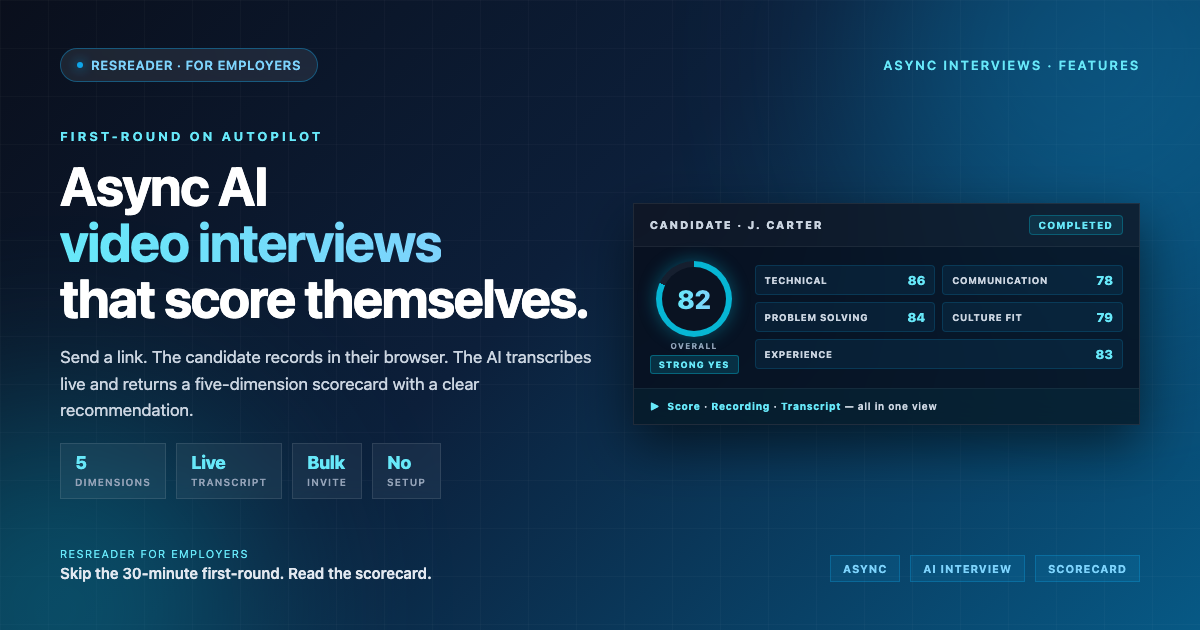
The transcript and recording are passed to a separate scoring function — GPT-4.1-mini, running against a structured rubric. It produces:
- An overall score (0–100).
- Per-dimension scores across five lenses:
- Technical skills — depth, accuracy, and relevance to the role.
- Communication — clarity, structure, conciseness.
- Problem solving — how the candidate approaches ambiguity.
- Culture fit — alignment with the values implied by the JD.
- Experience — relevance and depth of prior work for this role.
- A short AI summary (2–4 sentences).
- A strengths list and a weaknesses list.
- A recommendation —
strong_yes,yes,maybe,no, orstrong_no. - Per-question scores (0–10 each) tied to the actual answer given.
The scorecard isn't a black box. Every dimension comes with reasoning the recruiter can read.
6. The recruiter reviews on three tabs
Inside ResReader, the recruiter opens the completed interview and sees three tabs:
- Score — the scorecard, with every dimension, the strengths/weaknesses, and the recommendation.
- Recording — the WebM played back in-browser, scrubable to any moment.
- Transcript — the full Q&A with roles labelled, so you can scan in two minutes what would take fifteen to watch.
For most decisions, the transcript and the scorecard are enough. The recording is there for the times you want to see body language or hear tone.
7. The candidate's resume score is re-weighted
This is the part most async tools skip. After scoring, ResReader takes the interview score and folds it back into the candidate's overall resume rating. We weight it ~65% resume / 35% interview — so a strong interview can move a borderline resume up, and a weak interview can flag a strong-on-paper candidate before you waste a live call on them.
The recruiter sees one updated number, not two competing ones.
What we explicitly do not do
We're a software company writing about our own product, so honesty matters here. A few things async interview tools sometimes claim, that ResReader does not do:
- We don't expire invites automatically. A candidate's link stays live until you manually cancel the interview. If you want a deadline, communicate it in the email.
- We don't email recruiters when an interview is completed. You get an in-app notification — no email.
- We don't dynamically change questions per individual candidate after the interview is created. Questions are generated when the interview is created and then the AI works from that system prompt. We avoid repeats across attempts, but the question set isn't continuously personalised mid-session.
- We don't infer emotion from facial expressions. Some async video tools claim "emotion AI" that reads facial cues. There's solid academic doubt about how scientific that is, and we don't ship it. Our scoring is purely on the spoken content.
If a vendor sells you any of these as a feature, ask them to demo it on a real candidate.
When async beats live (and when it doesn't)
Async AI video interviews are great when:
- You have a high-volume top of funnel (50+ applicants per role).
- The first-round questions are structured and don't need real-time dialogue.
- Time zones are an issue (international hiring).
- You want every candidate to get the same fair shot — same questions, same scoring rubric.
They're a worse fit when:
- The role is senior enough that the first conversation is two-sided sales as much as evaluation.
- You're hiring for soft skills only an in-person read can catch (some leadership and partnership roles).
- You're hiring two or three people total and the calendar isn't the bottleneck.
Use them where they fit. Don't use them everywhere.
Send your first AI interview free →
Free plan ships with everything — async interviews included. No card.